
Getting traffic to your website is only half the battle. The real challenge, and where most businesses fall short, is turning that traffic into leads, customers, and revenue. That is what conversion rate optimization is all about.
The average website conversion rate across industries hovers around 2 to 3 percent. That means 97 out of every 100 visitors leave without taking action. Even small improvements to your conversion rate can have an outsized impact on your bottom line. Moving from 2 percent to 4 percent does not sound dramatic, but it means doubling your leads or sales from the same amount of traffic.
Here are ten proven strategies to improve your website conversion rate, backed by data and practical enough to implement right away.
1. Optimize Your Page Speed
Page speed is the foundation of conversion. If your website is slow, nothing else on this list matters because visitors will leave before they see any of it.
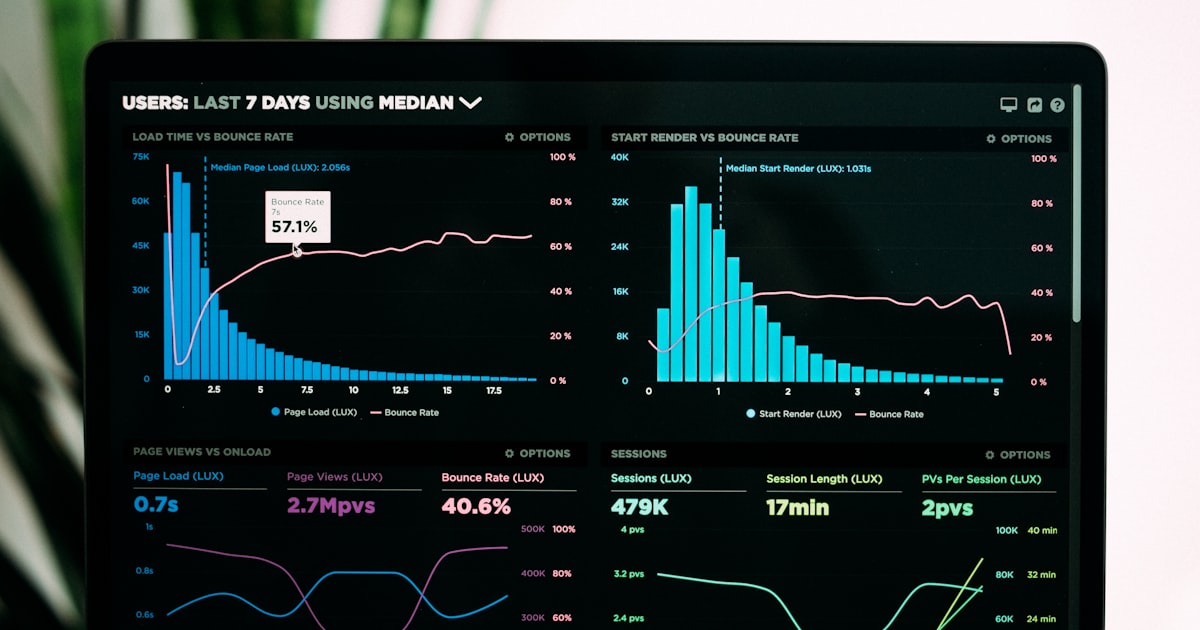
Google research shows that as page load time increases from one to three seconds, the probability of bounce increases by 32 percent. At five seconds, it jumps to 90 percent. Walmart found that for every one-second improvement in load time, conversions increased by 2 percent. For a deeper look at the relationship between load time and revenue, see our analysis of how website speed affects revenue.
What to Do
- Compress and properly size all images using modern formats like WebP
- Minimize and bundle CSS and JavaScript files
- Use a content delivery network to serve assets from servers closer to your visitors
- Enable browser caching for returning visitors
- Choose a hosting solution that prioritizes speed
- Eliminate render-blocking resources
A custom-coded website built on a modern framework will outperform a template-based site almost every time because there is no bloated code dragging it down. Performance-first web design is one of the most impactful investments you can make.
2. Clarify Your Value Proposition
When someone lands on your website, they should understand within five seconds what you do, who you do it for, and why they should care. If your value proposition is vague, generic, or buried below the fold, visitors will not stick around to figure it out.
Research from the Nielsen Norman Group indicates that most users leave a web page within 10 to 20 seconds. But pages with a clear value proposition can hold attention significantly longer.
What to Do
- Write a headline that clearly states the benefit you provide, not just what you do
- Place your value proposition above the fold where it is immediately visible
- Use a subheadline to add specificity and address your target audience directly
- Remove jargon and corporate speak in favor of plain language
- Test different value propositions to find what resonates most with your audience
Your homepage headline is arguably the single most important piece of copy on your entire website. Invest time in getting it right.
3. Add Social Proof Throughout the Experience
People look to others when making decisions. Social proof, in the form of testimonials, reviews, case studies, and client logos, reduces the perceived risk of doing business with you and builds the confidence visitors need to take action.
According to BrightLocal research, 87 percent of consumers read online reviews for local businesses. And a study by Spiegel Research Center found that displaying reviews can increase conversion rates by up to 270 percent.
What to Do
- Feature specific, results-oriented testimonials on key pages, not just a dedicated testimonials page
- Include the customer's name, role, and company photo where possible for credibility
- Display logos of well-known clients or partners in a prominent logo bar
- Create detailed case studies that show the problem, your solution, and measurable results
- Integrate Google or industry-specific reviews directly on your site
- Show the number of customers served, projects completed, or years in business
Social proof should not be confined to one section. Weave it throughout the pages where visitors are making decisions.
4. Place CTAs Above the Fold
A call-to-action that requires scrolling to find is a call-to-action that many visitors will never see. Data consistently shows that content above the fold receives significantly more engagement than content below it. If you're optimizing a dedicated landing page for paid ads rather than a full site, our landing page design that converts breakdown walks through the exact above-the-fold anatomy that works.
Research from the Nielsen Norman Group found that users spend 57 percent of their page-viewing time above the fold and 74 percent within the first two screenfuls. Your most important conversion elements need to live where attention is highest.
What to Do
- Place your primary CTA in the hero section of every key landing page
- Use contrasting colors that make the CTA button visually prominent
- Write action-oriented button text that communicates value, such as "Get Your Free Quote" rather than "Submit"
- Include a secondary CTA for visitors who need more information before committing, such as "See Our Work" or "Learn More"
- Ensure the CTA is visible and accessible on mobile without scrolling
Do not assume visitors will scroll down to find your call-to-action. Make it impossible to miss.
5. Prioritize Mobile Optimization
Mobile devices account for approximately 60 percent of web traffic globally. If your mobile conversion rate is significantly lower than desktop, you are leaving money on the table.
Google's research found that 61 percent of users are unlikely to return to a mobile site they had trouble accessing, and 40 percent visit a competitor's site instead. The mobile experience is not secondary. For many of your visitors, it is the only experience.
What to Do
- Design mobile-first, then adapt for larger screens
- Ensure all buttons and interactive elements are at least 48 pixels in size for easy tapping
- Simplify navigation for mobile users with a clean, intuitive menu structure
- Use mobile-specific features like click-to-call buttons and location-based directions
- Test your checkout or form submission process on multiple mobile devices
- Monitor mobile-specific analytics to identify where mobile users drop off
For e-commerce sites, mobile optimization is especially critical. A clunky mobile checkout process is the fastest way to kill your conversion rate.
6. Implement A/B Testing
Guessing what works is expensive. A/B testing lets you make data-driven decisions by comparing two versions of a page element to see which performs better.
Even small changes can produce significant results. Changing a button color, rewriting a headline, or moving a form can lead to measurable improvements in conversion rates. But you need actual data, not opinions, to know what works for your specific audience.
What to Do
- Start with high-impact elements: headlines, CTAs, hero images, and form layouts
- Test one variable at a time to isolate what drives the change
- Run tests long enough to reach statistical significance, typically at least two to four weeks depending on traffic
- Use tools like Google Optimize (or its successor), VWO, or Optimizely
- Document your tests and results to build institutional knowledge over time
- Prioritize tests based on potential impact and ease of implementation
A/B testing is not a one-time activity. The most effective websites are continuously testing and improving.
7. Display Trust Badges and Security Indicators
Online trust is fragile. Visitors need reassurance that their information is safe, your business is legitimate, and doing business with you carries minimal risk. Trust badges and security indicators provide that reassurance.
A study by Baymard Institute found that 18 percent of users abandoned a checkout process because they did not trust the site with their credit card information. For non-e-commerce sites, the principle still applies. Visitors need to feel safe before sharing their contact information.
What to Do
- Display SSL certificate indicators prominently, especially near forms and checkout
- Show industry certifications, professional memberships, and accreditation badges
- Include payment security logos (Visa, Mastercard, Stripe) near checkout areas
- Feature a money-back guarantee or satisfaction guarantee if applicable
- Add a clear privacy policy link near any form that collects personal information
- Display Better Business Bureau ratings or industry-specific review scores
Trust badges work best when placed near the point of conversion, right next to the form or checkout button where visitors are making their decision.
8. Simplify Your Forms
Every additional field in a form increases the friction for the visitor and decreases the likelihood they will complete it. Research consistently shows that shorter forms convert better.
HubSpot found that reducing form fields from four to three increased conversions by nearly 50 percent. Imagescape increased their conversion rate by 120 percent by reducing their form from eleven fields to four.
What to Do
- Only ask for information you genuinely need at this stage of the relationship
- For initial contact forms, name, email, and a message field are usually sufficient
- Use multi-step forms for complex inquiries, breaking them into manageable steps with progress indicators
- Enable autofill so browsers can populate fields automatically
- Use inline validation to catch errors in real time rather than after submission
- Remove CAPTCHA if possible, or use invisible alternatives that do not add friction for legitimate users
- Add a clear privacy statement explaining how you will use their information
The goal of your contact form is to start a conversation, not to qualify the lead completely before you have even spoken to them. Gather the minimum information needed and follow up personally for the rest.
9. Add Live Chat or Conversational Elements
Not every visitor is ready to fill out a form or make a phone call. Live chat provides an intermediate step that captures visitors who have questions but are not yet committed enough to submit a formal inquiry.
Research from Kayako found that 79 percent of businesses said offering live chat had a positive effect on sales, revenue, and customer loyalty. Forrester Research found that customers who engage in chat are 2.8 times more likely to convert.
What to Do
- Implement live chat on high-intent pages like pricing, services, and contact pages
- Use chatbots for after-hours coverage with clear handoff to human agents during business hours
- Set up proactive chat triggers based on visitor behavior, such as time on page or scroll depth
- Keep initial chat interactions light and helpful rather than aggressive or sales-focused
- Ensure chat transcripts are captured in your CRM for follow-up
- Monitor chat response times and aim for under thirty seconds during business hours
Live chat works best when it feels like a genuine conversation rather than a scripted sales pitch. Train your team to be helpful first and selling second.
10. Personalize the User Experience
Personalization means delivering different content, offers, or experiences based on who the visitor is and what they have done. It transforms your website from a one-size-fits-all brochure into a dynamic experience that adapts to each visitor.
According to McKinsey, 71 percent of consumers expect companies to deliver personalized interactions, and 76 percent get frustrated when this does not happen. Epsilon research found that 80 percent of consumers are more likely to make a purchase when brands offer personalized experiences.
What to Do
- Show different hero content based on the referring source, such as tailored messaging for visitors coming from a specific ad campaign
- Use location-based personalization to display relevant local information
- Display recently viewed products or services for returning visitors
- Customize CTAs based on where the visitor is in the buying journey, first-time visitors might see "Learn More" while returning visitors see "Get Started"
- Segment email campaigns based on the pages visitors have viewed on your site
- Use dynamic content blocks that change based on visitor behavior or demographics
Personalization does not have to be complex. Even simple adjustments like greeting returning visitors differently or showing location-specific content can improve conversion rates.
Putting It All Together
No single tactic on this list will transform your conversion rate overnight. The most effective approach is to implement multiple strategies simultaneously and continue refining based on data.
Start with the fundamentals: page speed, clear value proposition, and prominent CTAs. These three elements alone account for the majority of conversion issues on most websites. From there, layer in social proof, mobile optimization, and form simplification.
The compounding effect of multiple small improvements is powerful. A 10 percent improvement in page speed, a 10 percent improvement from better CTAs, and a 10 percent improvement from social proof do not add up to 30 percent. They multiply, creating gains that far exceed what any single change could achieve.
Track What Matters
You cannot improve what you do not measure. Set up proper tracking before implementing any changes:
- Conversion rate by page to identify which pages underperform
- Conversion rate by device to spot mobile-specific issues
- Conversion rate by traffic source to understand which channels deliver the most valuable visitors
- Form abandonment rate to identify where visitors drop off
- Page speed metrics to monitor performance over time
Google Analytics, combined with heatmap tools like Hotjar or Microsoft Clarity, gives you a comprehensive view of how visitors interact with your site and where they drop off.
Ready to Optimize Your Website for Growth?
At WebLaunch, conversion optimization is built into everything we do. We do not just build beautiful websites. We build websites that are engineered to turn visitors into customers. Every design decision, every line of code, every piece of content is created with your conversion goals in mind.
If your website is getting traffic but not generating the leads or sales it should, we can help.
Book a free strategy call and let us identify the biggest conversion opportunities on your site and build a plan to capture them.